
Project Configuration
This page explains how to manage configuration within Chainlink Runtime Environment (CRE) projects. It covers the standard project structure, the roles and usage of the configuration files (project.yaml and workflow.yaml), and the concept of targets for handling environment-specific settings.
You will understand:
- The recommended directory structure for CRE projects and the significance of key files.
- How to define global settings in
project.yamland override them with workflow-specific settings inworkflow.yaml. - The purpose of targets and how they enable seamless switching between different operational environments.
- The process by which the CRE CLI resolves and merges target configurations.
1. Glossary
Term | Definition |
|---|---|
| Project | A folder that groups one or more workflows plus shared files such as project.yaml, .env, and .gitignore. |
| Workflow | A sub-folder that contains everything needed to run one workflow (code, build artifacts, and the optional workflow.yaml). |
| Config | Any YAML file that lets you adjust how a workflow behaves (timeouts, trigger frequency, etc.). |
| Settings | Values that describe the runtime environment. Project settings live in project.yaml; workflow settings live in workflow.yaml. If both define the same key, the workflow value wins. |
| Target | A named set of settings (e.g. staging-settings, production-settings). Switching the target switches networks, RPC URLs, contract addresses, and other environment-specific values in one step. |
secrets.yaml | A project-level file that defines logical names for secrets and maps them to environment variables. |
| ABI | Application Binary Interface - a JSON file that describes a smart contract's functions, events, and data structures. |
| Bindings | Type-safe Go packages automatically generated from contract ABIs, enabling easy interaction with smart contracts from workflows. |
2. Project structure
A typical CRE Go project is organized as follows:
myProject/
├── go.mod                  # Go module definition
├── go.sum                  # Go dependency checksums
├── .env                    # Secret values (never commit to a Version Control System like Git)
├── .gitignore
├── project.yaml            # Global configuration
├── secrets.yaml            # Secret name declarations
├── contracts/              # Contract-related files
│   └── evm/
│       └── src/
│           ├── abi/        # Contract ABI files (.abi JSON format)
│           └── generated/  # Auto-generated Go bindings
├── workflow1/
│   ├── workflow.yaml       # Workflow-specific configuration
│   ├── main.go             # Your workflow code
│   └── …
├── workflow2/
│   ├── workflow.yaml       # Workflow-specific configuration
│   ├── main.go             # Your workflow code
│   └── …
└── …
go.mod/go.sum: Go module definition and dependency management for the entire project.project.yaml: Global settings, shared by every workflow in the project.workflow.yaml: Local settings for a single workflow. Define each target'sworkflow-name,deployment-registry, workflow artifacts, and any workflow-specific overrides here.secrets.yaml: Secret declarations, a manifest of logical secret names used across the project.contracts/evm/src/abi/: Contract ABIs, where you place.abiJSON files for contract binding generation.contracts/evm/src/generated/: Generated Go bindings, automatically created by the CRE CLI from your ABI files usingcre generate-bindings.
3. Configuration files
3.1. Global configuration (project.yaml)
project.yaml holds everything that rarely changes across workflows, such as RPC endpoints.
# project.yaml
staging-settings:
  rpcs:
    - chain-name: ethereum-testnet-sepolia
      url: https://ethereum-sepolia-rpc.publicnode.com

# You can define other targets for future use
production-settings:
  account:
    workflow-owner-address: "0x..." # Optional: For multi-sig wallets
  rpcs:
    - chain-name: ethereum-testnet-sepolia
      url: https://ethereum-sepolia-rpc.publicnode.com
    - chain-name: ethereum-mainnet
      url: https://mainnet.infura.io/v3/<YOUR-PROJECT-ID>
Configuration fields
Field | Required | When to use | Description |
|---|---|---|---|
account.workflow-owner-address | No | Multi-sig only | Multi-sig wallet address that owns the workflow. Required when using the --unsigned flag to generate unsigned transactions. For standard (non-multi-sig) deployments, omit this field—the CLI uses the address from CRE_ETH_PRIVATE_KEY. See Using Multi-sig Wallets. |
rpcs | Yes | Always (if using EVM) | Array of RPC endpoints for chains your workflow interacts with. Each entry requires chain-name (e.g., ethereum-mainnet) and url (the RPC endpoint). Required for both simulation and deployed workflows that use EVM capabilities. The CLI pre-populates a public Sepolia RPC URL by default. |
Environment variable interpolation in RPC URLs
RPC URLs support ${VAR_NAME} syntax to inject values from environment variables. This keeps sensitive API keys and endpoint tokens out of project.yaml, which is typically committed to version control.
# project.yaml
production-settings:
  rpcs:
    - chain-name: ethereum-mainnet
      url: https://mainnet.infura.io/v3/${INFURA_API_KEY}
    - chain-name: ethereum-testnet-sepolia
      url: https://eth-sepolia.g.alchemy.com/v2/${ALCHEMY_API_KEY}
Variable values are resolved from environment variables at runtime. This works across all CLI commands: cre workflow simulate, cre workflow deploy, and others.
3.2. Workflow configuration (workflow.yaml)
workflow.yaml captures details unique to one workflow instance, like its name.
# workflow.yaml
staging-settings:
  user-workflow:
    workflow-name: "my-por-workflow-staging"
    # deployment-registry: "private" # Optional (new in v1.14.0). Omit to use the default onchain registry.
  workflow-artifacts:
    workflow-path: "." # Points to the workflow directory
    config-path: "./config.staging.json"
    secrets-path: "" # Empty if not using secrets

production-settings:
  user-workflow:
    workflow-owner-address: "<address>" # Optional: For multi-sig wallets
    workflow-name: "my-por-workflow-production"
    # deployment-registry: "onchain:ethereum-mainnet" # Explicit onchain registry (also the default when omitted).
  workflow-artifacts:
    workflow-path: "." # Points to the workflow directory
    config-path: "./config.production.json"
    secrets-path: "" # e.g. "../secrets.yaml" if using secrets
Configuration fields
Field | Required | Description |
|---|---|---|
user-workflow.workflow-name | Yes | The name of your workflow. This name is used to identify the workflow when deploying, activating, or managing it via CLI commands. Best practice: include environment suffix (e.g., -staging, -production). |
user-workflow.workflow-owner-address | No | Multi-sig wallet address (if applicable). Overrides the value from project.yaml for this specific workflow. See the project.yaml configuration table above for details. |
user-workflow.deployment-registry | No | New in v1.14.0. Selects which registry receives this target's deployment. When omitted, the CLI defaults to the public onchain Workflow Registry (same behavior as before v1.14.0). Set to "private" for Chainlink-hosted private registry management via your CRE login session (no linked key or gas required for registry operations). Set to "onchain:ethereum-mainnet" to explicitly target the public onchain Workflow Registry. Run cre registry list to see registries available to your organization. |
workflow-artifacts.workflow-path | Yes | Path to your workflow entry point. For Go: "." (current directory). For TypeScript: "./main.ts" (or your entry file name). |
workflow-artifacts.config-path | Yes | Path to your workflow configuration JSON file (e.g., "./config.staging.json" or "./config.production.json"). |
workflow-artifacts.secrets-path | No | Path to your secrets YAML file (e.g., "../secrets.yaml"). Use "" (empty string) if not using secrets. See Secrets Management for details. |
3.3. Secrets configuration (secrets.yaml)
secrets.yaml is an optional project-level file that maps logical secret names to environment variables. This allows you to decouple the secret names used in your code from the actual environment variable names.
# secrets.yaml (at project root)
secretsNames:
  DATA_SOURCE_API_KEY:
    - DATA_SOURCE_API_KEY_ENV
To use secrets in your workflow, reference this file in your workflow.yaml:
workflow-artifacts:
  secrets-path: "../secrets.yaml"
For simulation, secret values are loaded from your .env file or environment variables. For deployed workflows, secrets are managed through the Vault DON using cre secrets commands.
For complete details on using secrets in your workflows, see Secrets Management.
4. Targets
A target is a top-level key inside both project.yaml and workflow.yaml. It bundles all settings for a single environment or variant.
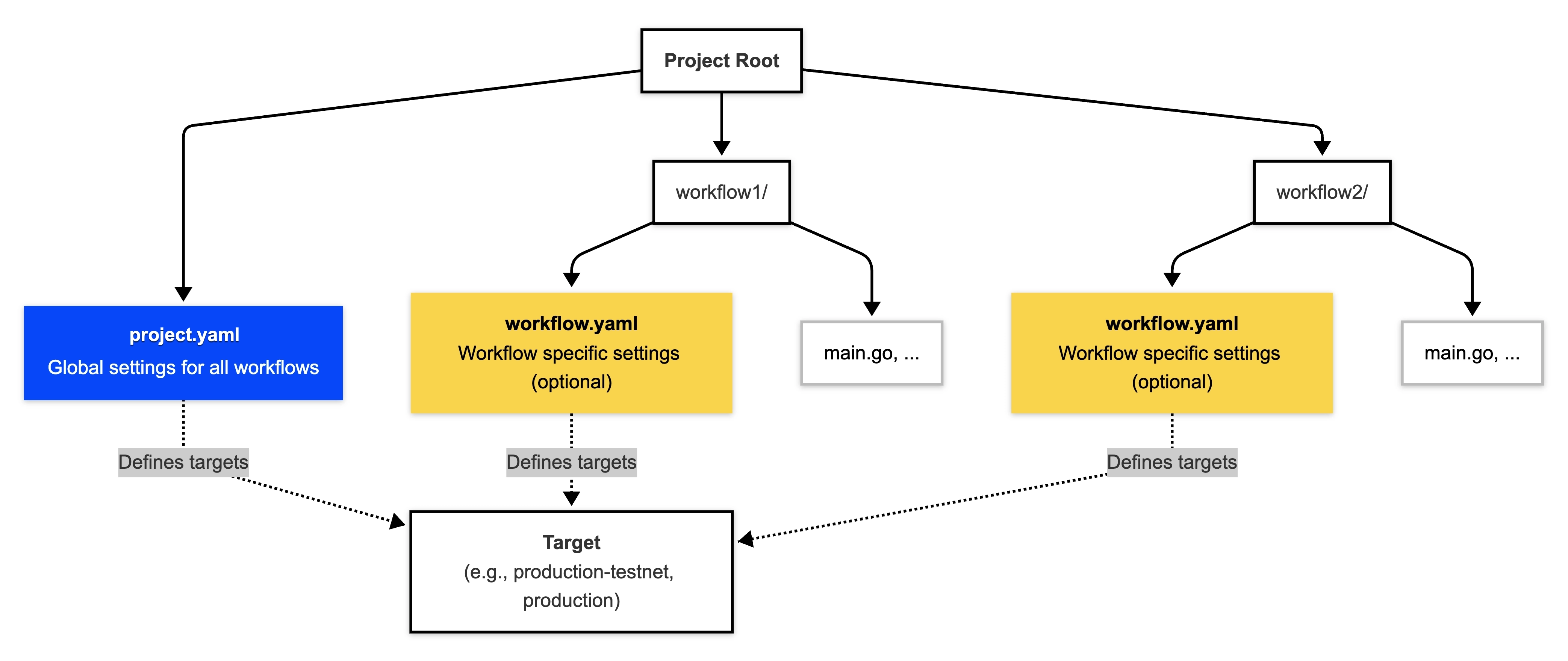
How global (project.yaml) and local (workflow.yaml) settings define targets.
The CLI selects the active target using the --target flag. Example:
# Simulate using the 'staging-settings' target
cre workflow simulate my-workflow --target staging-settings
Alternatively, the CRE_TARGET environment variable can be used to specify the target. The CLI picks the active target in this order:
--target <name>flagCRE_TARGET=<name>environment variable
4.1. Defining Multiple Targets
You can store many targets in one file. This is useful for managing different environments (like simulation vs. production) or for testing variations of a workflow.
# In project.yaml

# Target for simulation and testing
staging-settings:
  rpcs:
    - chain-name: ethereum-testnet-sepolia
      url: https://ethereum-sepolia-rpc.publicnode.com

# Target for production deployment
production-settings:
  account:
    workflow-owner-address: "0x123..." # Optional: For multi-sig wallets
  rpcs:
    - chain-name: ethereum-mainnet
      url: https://mainnet.infura.io/v3/<YOUR-PROJECT-ID>
4.2. How Target Resolution Works
When you run a CLI command with a target, e.g., --target staging-settings:
- Load the
staging-settingstarget fromproject.yaml. - Load the same target from
workflow.yaml(if the file exists and contains a matching target definition). - Merge the two objects.
- Keys present in both files → value from
workflow.yamlwins. - Keys present in only one file → that value is used.
- Keys present in both files → value from
- Validate the final object before execution.
5. Updating dependencies
When new networks or SDK features are released, you may need to update your project dependencies.
Updating the CLI
Run cre update to download and install the latest CLI version:
cre update
New projects created with an updated CLI automatically use compatible SDK versions.
Updating the SDK (existing projects)
If you created your project with an older CLI version, update the SDK in your go.mod:
go get github.com/smartcontractkit/cre-sdk-go@v1.7.0
Then run go mod tidy to clean up dependencies.
Checking your versions
- CLI version: Run
cre version - SDK version: Check
go.modfor thecre-sdk-godependency version
For a list of which versions support which networks, see Supported Networks.