
Canton Integration Guide
This guide walks through integrating Chainlink Data Streams to consume cryptographically verified market data within your Canton application.
Understanding the Canton Network
Unlike traditional blockchains where all state is replicated across all nodes, the Canton Network is a privacy-preserving blockchain that distributes state and transactions only to parties with a legitimate need to see them. This "network of networks" architecture allows validators to store and process only their portion of the ledger, designed to balance privacy and scalability with the decentralization model of a public blockchain. Learn more about the Canton Network.
Canton Network applications are built on infrastructure that manages ledger state through two types of nodes:
- Validator Nodes store and validate the portion of the ledger they are entitled to see
- Synchronizer Nodes coordinate transaction commits to prevent double-spends
- Access to ledger data is managed through Daml parties—identifiers for cryptographic keys that represent app providers and app users
- Each Daml party is hosted on a Validator Node, which stores their data and validates transactions on their behalf
For Chainlink Data Streams integration, this party-based model means:
- Your application needs a Daml party to verify reports
- The Chainlink team grants your Daml party observer access to the
VerifierConfigcontract, which contains the oracle public keys required for signature verification - When you verify a Chainlink Data Streams report, your Daml application exercises a choice on the
Verifiercontract - Verification occurs within your Canton ledger context using the configuration your Daml party can observe
How It Works
Reports are generated off-chain by Chainlink's OCR (Off-Chain Reporting) protocol and contain f+1 cryptographic signatures from oracle nodes. Your Canton application verifies these signatures before consuming the data.
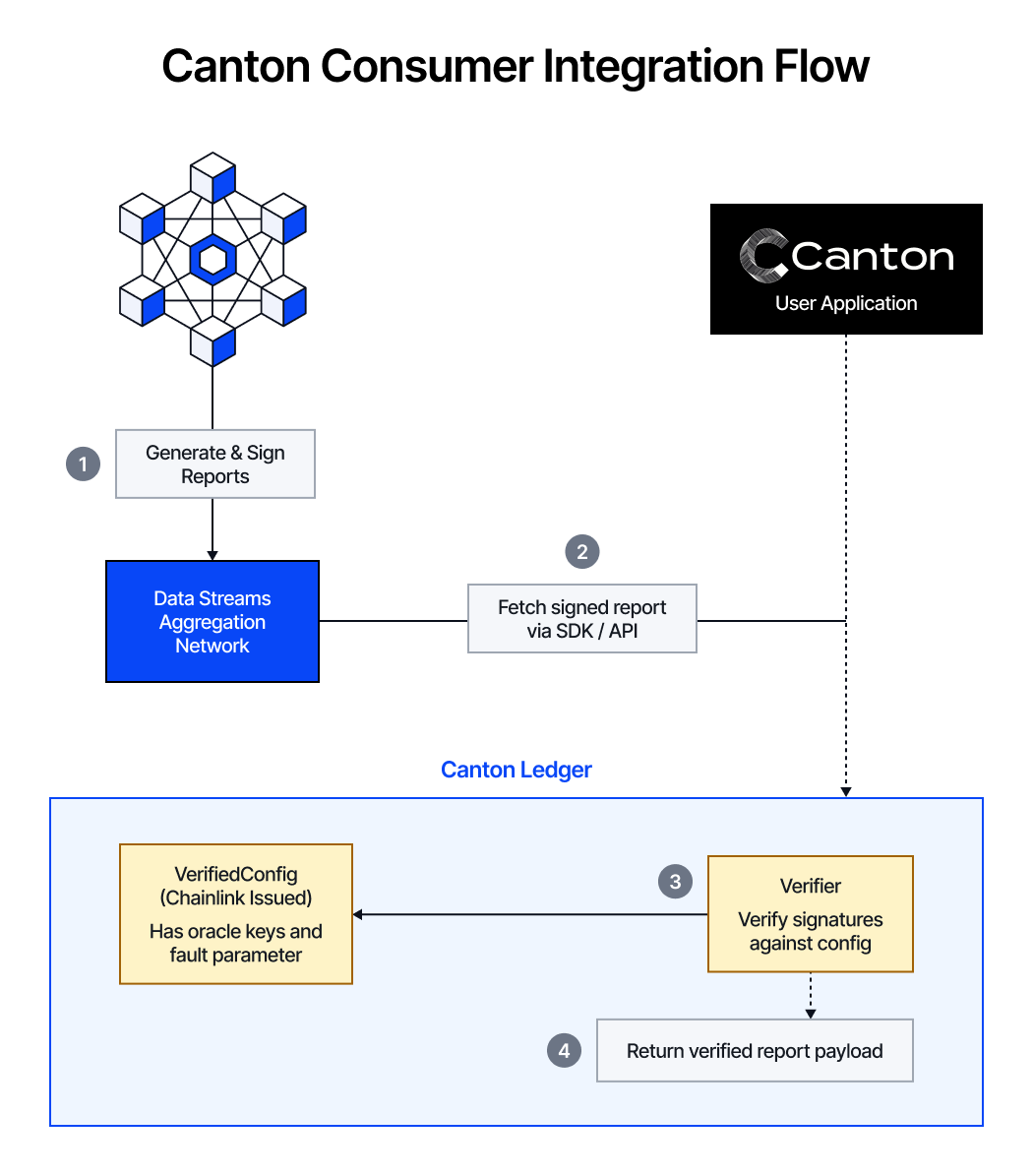
Canton Consumer Integration Flow: (1) Chainlink DON generates and signs reports, (2) your Canton application fetches the signed report via SDK or API, (3) the Verifier contract verifies signatures against the Chainlink-issued VerifierConfig containing oracle keys and the fault tolerance parameter, and (4) returns the verified report payload.
Key components:
Verifier- A stateless contract that performs cryptographic signature verification against oracle public keys. You create and own this contract.VerifierConfig- A party-specific contract holding the oracle public keys and fault tolerance configuration. Chainlink issues this to you after onboarding.
The Verifier is intentionally stateless and separated from configuration management—this allows you to create your own Verifier instances while using the Chainlink-issued VerifierConfig for the oracle keys.
Prerequisites
To get started with your Data Streams integration on the Canton Network, you need:
- Access to a Canton participant node
- Ability to upload DAR packages to your Canton participant node
- Familiarity with Daml contract development
- Access to the Chainlink Data Streams API
Tutorial
Obtain Data Streams Access
Contact Chainlink to request access to the Data Streams API. You will receive:
- API credentials (Client ID and Client Secret)
- Access to the Data Streams REST/WebSocket endpoints
For more information on Data Streams, see the official Chainlink Data Streams documentation.
Download Daml Contracts
Download the verification contracts from the GitHub releases page:
https://github.com/smartcontractkit/data-streams-canton/releases
The release includes the following DAR packages:
| Package | Description |
|---|---|
common-1.0.0.dar | Shared utilities and data types |
domain-1.0.0.dar | Domain-specific types for Data Streams |
verifier-config-1.0.0.dar | Configuration contract for oracle keys |
verifier-1.0.0.dar | Verification engine for validating reports |
Upload Contracts to Canton
Upload the DAR packages to your Canton participant node:
common-1.0.0.dardomain-1.0.0.darverifier-config-1.0.0.darverifier-1.0.0.dar
For guidance on uploading DAR packages, see the Canton documentation on deploying Daml code.
Request Configuration
Once the contracts are uploaded, provide your Canton Party ID to the Chainlink team. This is the party identifier that will be verifying reports within your application.
The Chainlink team needs this to:
- Add your party as an observer on the
VerifierConfigcontract - Enable your party to use the verification functionality
Your Canton Party ID is typically in the format party::namespace and can be retrieved from your Canton participant admin console or via the Ledger API.
Receive VerifierConfig
After onboarding, the Chainlink team will issue a VerifierConfig contract to your party. This contract contains:
- Oracle public keys for signature verification
- Fault tolerance parameter (
f) defining the required signature threshold (f+1signatures required) - Configuration digest for active oracle sets
Verify Reports
With everything in place, you can now verify Data Streams reports:
Fetch a signed report from the Data Streams API
Choose from the available streams in the Streams Overview page. Use the Data Streams SDK or REST API to fetch reports. The API returns hex-encoded signed reports containing:
- The report payload (price data, timestamps, etc.)
f+1cryptographic signatures from Chainlink oracle nodes
Learn more about how to fetch and decode reports with the Go, Rust, and TypeScript SDKs in the Fetch and decode reports tutorial.
Submit to your Canton application
Your Daml application calls the Verify choice on the Verifier contract. First, import the required modules:
import Verifier
import DA.Crypto.Text (BytesHex)
Then create or reference a Verifier instance and call the Verify choice:
-- Create a Verifier instance (stateless, can be reused)
verifierCid <- submit myParty $ createCmd Verifier with
  owner = myParty
  observers = []

-- Hex-encoded signed report from the Data Streams API
let signedReport : BytesHex = "0x..."

-- Verify the report using your VerifierConfig Contract ID
reportData <- submit myParty $ exerciseCmd verifierCid Verify with
  configCid = myVerifierConfigCid
  signedReportBytes = signedReport
  sender = myParty
Use the verified data
If verification succeeds, reportData contains the hex-encoded report payload. You can parse this data for use in your application. For example, to decode a V3 crypto report:
import ReportDataV3 (parseReportDataV3)

-- Parse the verified report payload
let v3 = parseReportDataV3 reportData

-- Access the decoded report fields
let feedId = v3.feedId                             -- Stream identifier
let benchmarkPrice = v3.benchmarkPrice             -- Price with 18 decimals
let bid = v3.bid                                   -- Bid price
let ask = v3.ask                                   -- Ask price
let validFromTimestamp = v3.validFromTimestamp     -- Report valid from
let expiresAt = v3.expiresAt                       -- Report expiration
let observationsTimestamp = v3.observationsTimestamp
Working with hex-encoded values
Report fields like benchmarkPrice, bid, and ask are returned as hex strings. The reference HexToDecimal.daml module provides a hexToUnsignedDecimal helper for converting these to Daml Decimal values.
Why hexToUnsignedDecimal instead of fromHex?
Daml's built-in fromHex returns Optional Int, which is limited to 64 bits and returns None when the sign bit is set. hexToUnsignedDecimal uses Decimal to handle larger values safely.
Decimal precision
Daml's Decimal type has 38 significant digits with 10 fixed decimal places, supporting values up to approximately 10^28. EVM price values use 18 decimal places, so divide by 10^18 to get human-readable amounts:
let oneEth : Decimal = 1000000000000000000.0
let price = v3.benchmarkPrice / oneEth  -- e.g., 3257.58 USD
Signed values
hexToUnsignedDecimal is unsigned. For signed two's complement values, subtract 2^n manually:
-- Interpreting a negative int64 value
let twoTo64 : Decimal = 18446744073709551616.0
let value = hexToUnsignedDecimal negHex - twoTo64
The table below shows which bit widths fit within Decimal precision:
| Bit width | Maximum value | Fits in Decimal? |
|---|---|---|
| int64 | ~1.8 × 10^19 | Yes |
| int128 | ~3.4 × 10^38 | Yes |
| int192 | ~6.3 × 10^57 | No |
| int256 | ~1.2 × 10^77 | No |
For values that exceed Decimal precision, consider storing the raw hex string and converting on-demand, or splitting the value into separate whole and fractional components.
Important Considerations
See the Developer Responsibilities page for important considerations when integrating Chainlink Data Streams. The following are important considerations specific to Canton integration:
- Config Updates: When oracle configurations change, you'll receive a new
VerifierConfigContract ID. Your application must look up the latest Contract ID when verifying reports. - Observer Access: You must be explicitly added as an observer to query
VerifierConfig. Verification results are only visible to the verifying party and contract observers.