
How Active Monitoring Works
Active Monitoring runs one loop for the tokens you register: detect a risk signal, decide with your rules, act onchain, and prove what happened. This page follows one risk alert through that loop, so you know what runs when, and which part of it you control.
Four terms recur on this page:
- TRM is TRM Labs, the blockchain analytics provider that scores the risk of each address. You use your own TRM account.
- A risk event is a change in an address's TRM risk level, or its first screening.
- A decision is the record Active Monitoring keeps when a rule matches a risk event.
- An enforcement function is a function on your token, or on a contract associated with it, that Active Monitoring calls to act onchain.
Active Monitoring is the continuous side of ACE: it reacts after the fact, on tokens that are already deployed. Policy Management is the preventive side: it blocks a transaction while it executes. See Preventive and Continuous Compliance for when to use each.
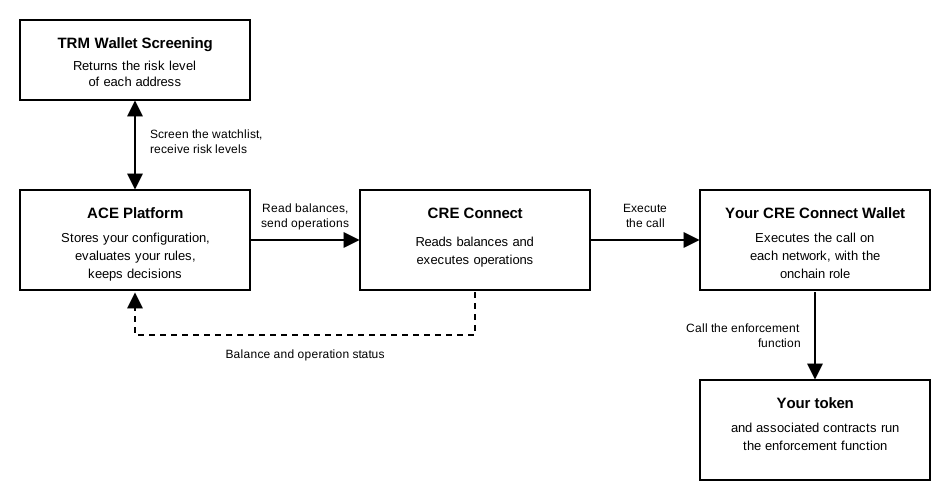
The components involved in Active Monitoring
What you set up
Before the loop runs, you configure five things:
- A TRM API key and a screening interval.
- A monitored token with the enforcement functions Active Monitoring may call.
- The onchain role that lets your CRE Connect Wallet call those functions.
- A monitoring rule that maps each TRM risk level to a response.
- A watchlist of the addresses to screen.
Then you start screening. Nothing runs before that.
One alert, step by step
- Screen. At each scheduled run, Active Monitoring sends every watchlist address to TRM Wallet Screening with the TRM API key you stored. TRM returns the highest risk level of each address.
- Detect a change. Active Monitoring compares each risk level with the previous one. It raises a risk event for an address the first time it is screened and whenever its level changes. An address whose level stays the same raises no new event.
- Match the rule. Active Monitoring checks each risk event against the monitoring rule of every monitored token, on every network of that token. Each rule that matches creates a decision on that network.
- Read the balance, if the rule asks for it. When a rule has the balance condition and the risk level matches, Active Monitoring reads the balance of the address with
balanceOf(address)on the token, through CRE Connect, on the network of the decision. The decision stays Evaluating until the balance arrives. The decision records the block of the reading. - Decide. The rule's response sets the outcome: Silently log records it, Flag waits for a person, and Enforce creates an operation for each enforced action.
- Act. For each enforced action, Active Monitoring encodes the call to your enforcement function and creates an operation. CRE Connect executes it through your organization's CRE Connect Wallet. Who signs depends on your signing model.
- Track. The operation moves through the statuses Submitted, Sending, Pending signature (self-signing only), Executing, and Success or Failed. The decision shows the latest status.
- Prove. The decision keeps the TRM result as returned, the conditions that were evaluated, the balance reading, the arguments of each call, the operation, and who resolved or enforced it. See Decisions, Review, and Audit Trail.
What runs where
| Part | What it does |
|---|---|
| ACE Platform | Stores your configuration, calls TRM on schedule, evaluates your rules, and keeps decisions. |
| TRM Wallet Screening | Returns the risk level of each address. You provide your own TRM API key. |
| CRE Connect | Reads balances and executes operations, and reports their status back to ACE. |
| Your CRE Connect Wallet | Executes the call on your token on each network. It needs the onchain role. |
| Your token and associated contracts | Run the enforcement function. Active Monitoring never changes their code. |
Active Monitoring does not run any code on your contracts and does not add a contract to your token. It needs only the ABI, the addresses, and the role.
How long each step takes
The time between a risk change at TRM and a decision depends mostly on your screening interval: a change is seen at the next scheduled run. After a run, evaluation and the balance reading usually complete shortly after.
For an Enforce response, the time to a confirmed operation then depends on the signing model and the network. With self-signing, the operation waits for your signer. With delegated signing, it does not wait for a signature, and the time is bounded by CRE Connect and the confirmation time of the network.
A Flag response waits for a person for as long as it takes to review it.
What Active Monitoring does not do
- It screens only the addresses on your watchlist. It does not discover your token holders or screen the counterparties of transfers.
- It does not block a transaction. Preventive blocking is the role of Policy Management.
- It does not grant or check onchain roles. You grant the role, and an operation fails if the role is missing.
- It uses TRM as its only screening provider in Beta.
Next steps
- Watchlist and Screening: what is screened, how often, and what counts as a change.
- Monitoring Rules and Responses: how a risk level becomes an outcome.
- Active Monitoring Quick Start: set up the loop end to end.