
Policy Ordering and Composition
Policies attached to a function execute sequentially, and the order they run in determines the security and behavior of your compliance ruleset. This page covers why ordering matters, how to manage the policy chain, and best practices for composing effective policy chains. For a detailed explanation of the execution model and component interactions, see Policy Management.
Why order matters
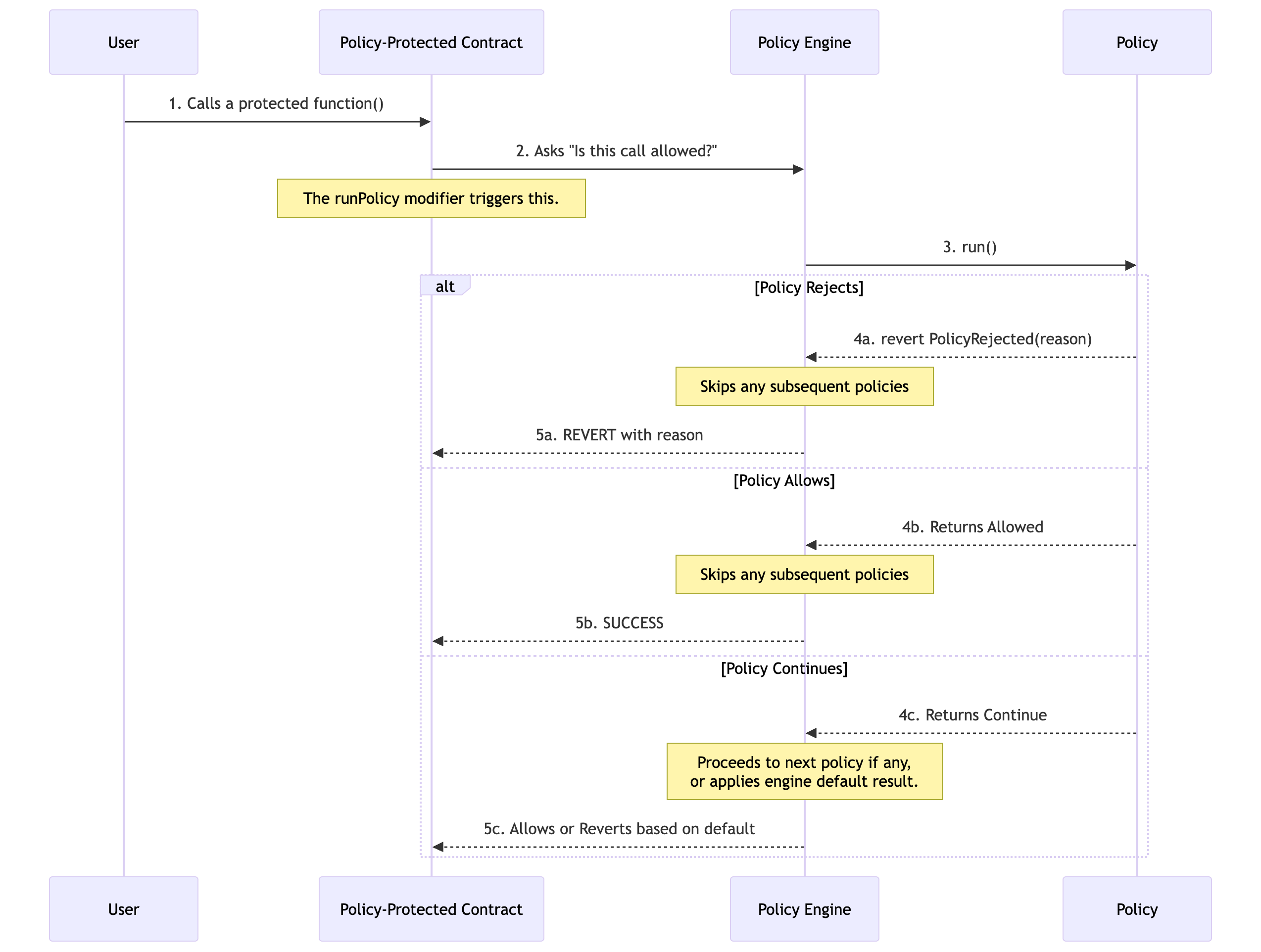
Each policy in the chain produces one of three outcomes:
- Reject — The policy reverts with
PolicyRejected. The transaction reverts immediately and no subsequent policies run. - Allow — The policy returns
Allowed. The transaction is approved immediately and all subsequent policies are skipped. - Continue — The policy's check passed, but the decision is deferred to the next policy in the chain.
Both Reject and Allow are terminal — they end the chain. This means the position of each policy directly controls which policies actually execute.
For a detailed breakdown of each outcome and its interaction with postRun(), see Policy outcomes in detail.
Ordering example
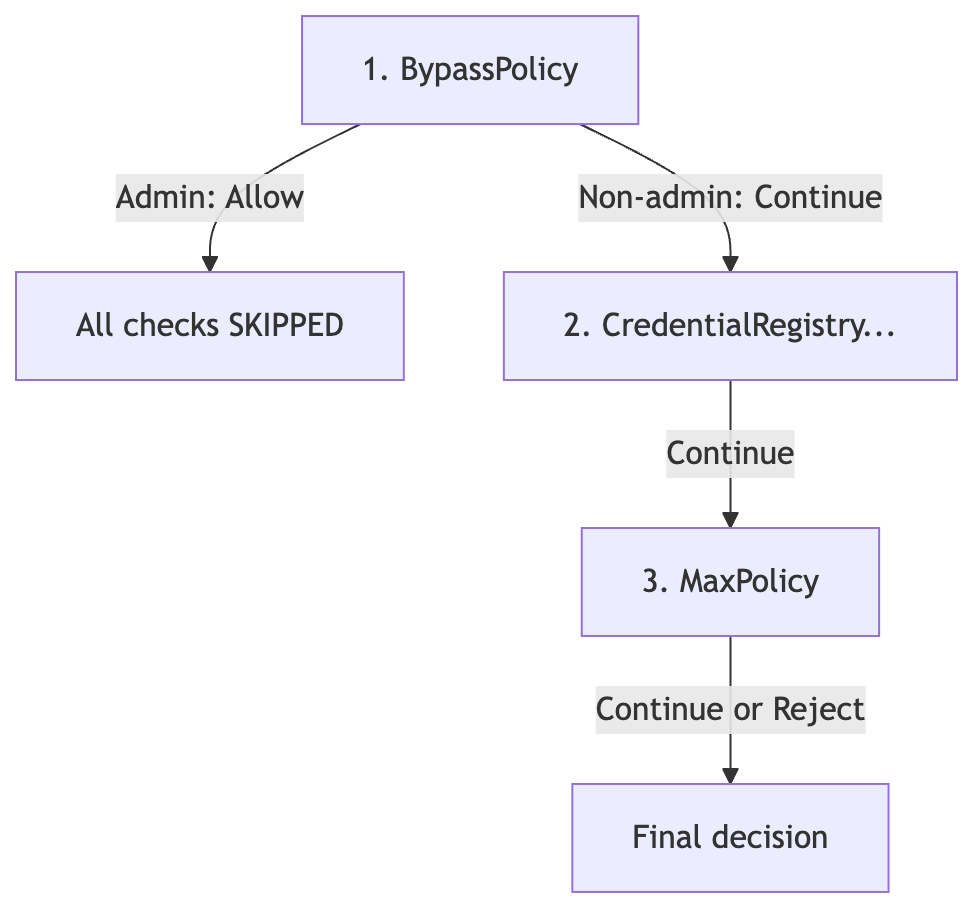
Consider three policies attached to a token's transfer function: a CredentialRegistryIdentityValidatorPolicy (verifies KYC credentials), a MaxPolicy (caps individual transfers), and a BypassPolicy (allows admins to skip all checks).
Ordering A — BypassPolicy first:
Ordering B — Restrictive checks first:
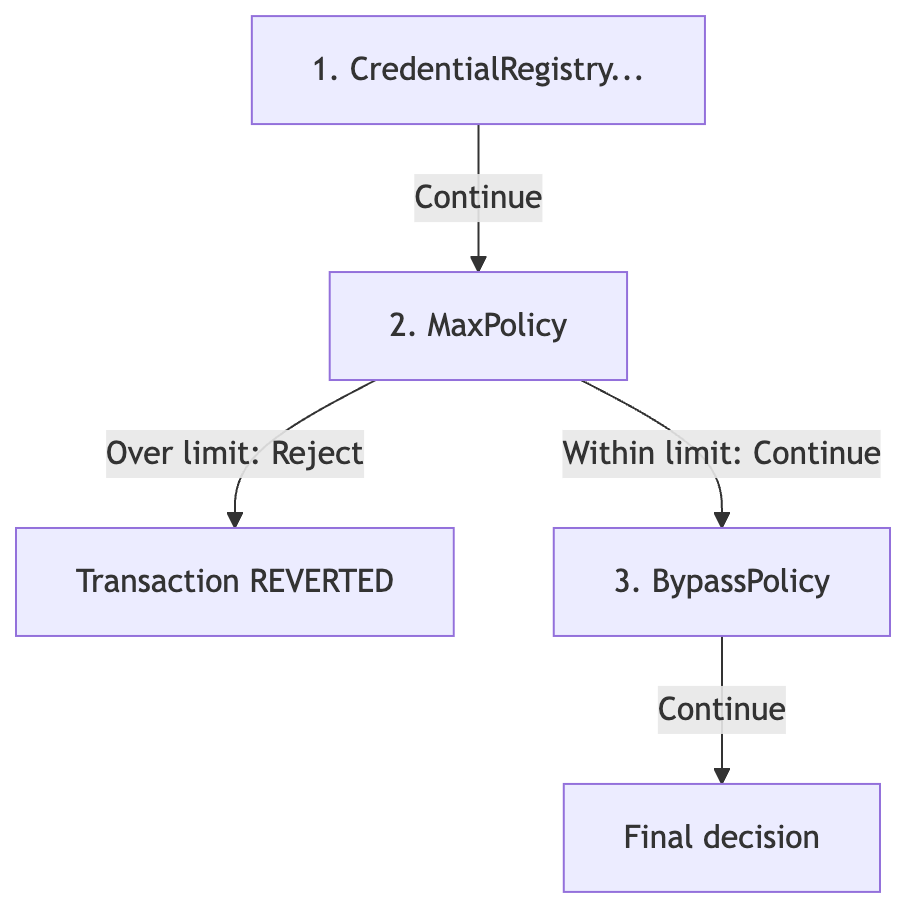
In Ordering A, an admin skips both the credential check and the transfer cap. In Ordering B, every address — including admins — must pass the credential and transfer-limit checks first. The BypassPolicy only applies after the critical checks have passed, so admins are still subject to the same compliance and risk controls as everyone else.
How the engine evaluates a chain
This sequence diagram shows the full evaluation flow when the PolicyEngine processes a chain of policies:
The default result
If every policy in the chain returns Continue and none makes a final Allow or Reject decision, the PolicyEngine applies a configurable default result. The default can be set to either allow or reject, and it is configured per target contract via the desired_default_allow field.
true(default) — The transaction is allowed. Use this when policies act as blockers and everything else should pass through.false— The transaction is rejected. Use this for allowlist-style enforcement where only explicitly approved transactions proceed.
This matters when all your policies use the Continue pattern (which is the most common approach for composable policy chains). If the default is set to reject but you intended all-Continue to mean "all checks passed," your transactions will revert unexpectedly.
To view or change the default result for a target contract, see Managing Targets — Default allow behavior.
Managing the policy chain
Policies are managed per target contract and per function selector — each protected function on each contract has its own independent policy chain.
During ACE Beta, policy chain management is handled through the ACE Platform — the Platform UI or Coordinator API:
- Adding a policy — When you attach a policy to a protected function, it is appended to the end of the existing chain by default. You can specify a position to insert it at a specific index instead, shifting existing policies to the right.
- Removing a policy — Removing a policy shifts the remaining policies to maintain their relative order.
- Reordering — To move a policy to a different position, remove it and re-add it at the desired index.
- Viewing the chain — Use the Platform UI or API to see the current policy chain for any protected function, listed in execution order.
Best practices
Order restrictive checks first
Place policies that reject unauthorized or dangerous transactions at the beginning of the chain. This ensures critical security checks (sanctions screening, credential verification) cannot be bypassed by an earlier Allow result.
A recommended ordering pattern:
- Security checks — Sanctions screening, credential verification, pause controls
- Business logic — Volume limits, rate limits, time-based restrictions
- Permissive overrides — Admin bypass or emergency override policies (if needed)
Use Allow sparingly
Policies that return Allow skip every subsequent policy in the chain. This is powerful but dangerous if misplaced. Reserve Allow for deliberate bypass scenarios (like an admin override), and place these policies after the checks they are intended to bypass — not before.
Keep chains short
Each policy in the chain costs gas. While the PolicyEngine is designed for efficiency (extractors run once and parameters are mapped per policy), long chains increase transaction costs. Group related checks into a single policy where practical, and avoid redundant policies.
Review ordering after changes
Any time you add, remove, or reorder a policy, review the full chain to confirm the new ordering matches your intent. A single misplaced policy can create a gap in your compliance coverage.
For additional security guidance around trust boundaries, external call risks, and context handling, see Security Considerations.