
 CREATED BY CHAINLINK LABS
 LinkLab Masterclass Book
The book is available at: https://smartcontractkit.github.io/x402-cre-price-alerts/
Overview
x402-cre is a demonstration project that showcases a complete crypto price alert system integrating three cutting-edge technologies:
- x402 Payment Protocol - Micropayment system for API access
- Chainlink CRE (Chainlink Runtime Environment) - Decentralized workflow execution for on-chain operations
- Gemini AI - Natural language processing for user interaction. While we used Gemini here you can use any LLM that has an OpenAI-API compatible endpoint.
This repository serves as a public demo to help developers understand how to build applications that combine AI-powered interfaces, payment-protected APIs, and blockchain-based automation.
LiveStreamed LinkLab Walkthrough
This demo was done live on a Chainlink Linklab Session that was livestreamed. You can watch the video and follow along here.
What It Accomplishes
The system allows users to create cryptocurrency price alerts through natural language conversation. Here's what happens:
- User sends a message like "Alert me when BTC is greater than 60000"
- AI interprets the request and extracts alert parameters (asset, condition, target price)
- User pays $0.01 USDC via x402 payment protocol to create the alert
- CRE workflow HTTP trigger your x402 gateway server triggers your custom workflow using CRE's HTTP Capability
- Alert is stored on-chain in a smart contract via Chainlink CRE's On-Chain Write Capability
- CRE Cron Triggers monitor on-chain prices periodically using Chainlink Price Feeds
- User receives push notification on phone when the price condition is met
This demonstrates a complete flow from user interaction → payment → blockchain storage → automated monitoring → notification delivery.
Minimal System Flow
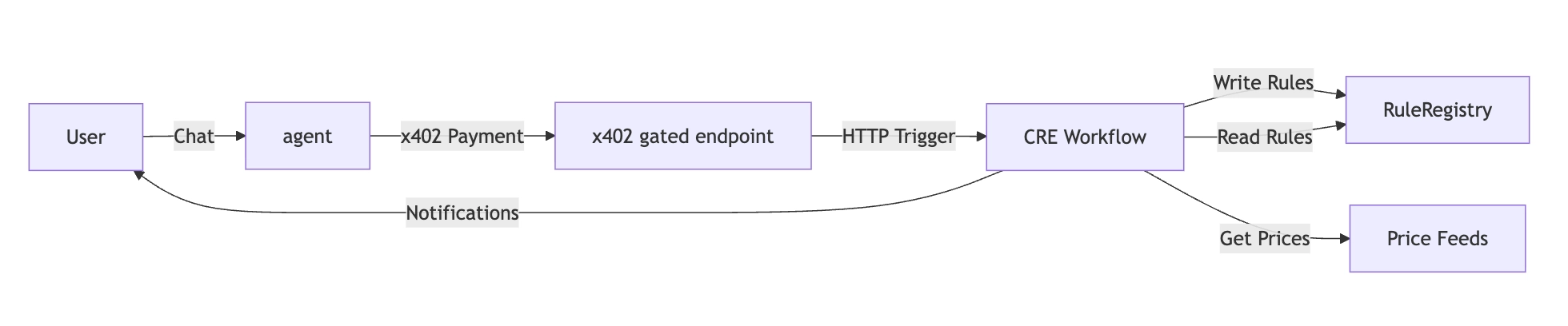
Prerequisites
Before starting, ensure you have the following:
Required Software
- Node.js (v18 or higher) and npm
- Bun for the CRE post install script. Install here.
- Chainlink CRE CLI installed and configured. Install here.
- Git for cloning the repository
Required Accounts & Keys
- Gemini API Key: Get from Google AI Studio
- Pushover Account:
- Sign up at pushover.net
- Install Pushover app on your mobile device
- Register your pushover app to get the API token and get your User Key from the Pushover dashboard
- Wallet with ETH and USDC on Base Sepolia:
- Private key for the agent wallet (used for x402 payments)
- add Base Sepolia to your wallet (go here)
- Get ETH on Base Sepolia testnet from this faucet for contract deployment.
- Get 1 USDC token on Base Sepolia testnet from this faucet for x402 payments (x402 facilitator covers gas fees)
Setup
1 Deploy RuleRegistry on Base Sepolia
Deploy contracts/RuleRegistry.sol to Base Sepolia. The constructor requires two parameters:
- USDC token address:
0x036CbD53842c5426634e7929541eC2318f3dCF7e(Base Sepolia USDC) - Chainlink Forwarder address:
0x82300bd7c3958625581cc2f77bc6464dcecdf3e5(Base Sepolia CRE Simulation Forwarder)
You can use this Remix IDE link for this.
2 Clone and install dependencies
git clone https://github.com/smartcontractkit/x402-cre-price-alerts.git
cd x402-cre-alerts
This repository uses npm workspaces. Install all dependencies with a single command:
npm install
This will install dependencies for both the server and cre/alerts workspaces. The cre/alerts post install script will automatically run bunx cre-setup.
3 Configure environment variables
Create a .env file in the project root (workspace root):
cp .env.example .env
Environment Variables Explained:
PORT: Server port (default: 3000)X402_RECEIVER_ADDRESS: Address that receives x402 payments (Can be an EOA or Deployed RuleRegistry contract/contracts)X402_FACILITATOR_URL: x402 facilitator endpoint (default:https://x402.org/facilitator)GEMINI_API_KEY: Your Gemini API key for natural language processingAGENT_WALLET_PRIVATE_KEY: Private key of wallet used to make x402 payments (must have USDC on Base Sepolia). You can use the same key in step 4 as your CRE PK.
4 Configure CRE secrets
Add CRE-specific environment variables to the root .env file (same file as Step 3):
# Add these to your root .env file
# CRE_ETH_PRIVATE_KEY is used during local simulation when using the EVM Write capability.
# Transactions written will be signed by your PK. In production, a dedicated CRE DON will be the signer.
CRE_ETH_PRIVATE_KEY=your_eth_private_key
CRE_TARGET=staging-settings
PUSHOVER_USER_KEY_VAR=your_pushover_user_key
PUSHOVER_API_KEY_VAR=your_pushover_api_key
5 Configure CRE workflow
Edit cre/alerts/config.staging.json for staging/testing, or cre/alerts/config.production.json for production.
Update the config with your ruleRegistryAddress obtained in Step 1. If you were unable to deploy, you may use 0x9B9fC1EeF6BFC76CD07501Ae81b66f24fAB322B1 (note: this demo contract may be populated with multiple alerts from other developers).
{
  "schedule": "0 0 * * * *",
  "ruleTTL": 1800,
  "publicKey": "",
  "evms": [
    {
      "ruleRegistryAddress": "your_deployed_rule_registry",
      "chainSelectorName": "ethereum-testnet-sepolia-base-1",
      "gasLimit": "1000000",
      "dataFeeds": {
        "BTC": "0x0FB99723Aee6f420beAD13e6bBB79b7E6F034298",
        "ETH": "0x4aDC67696bA383F43DD60A9e78F2C97Fbbfc7cb1",
        "LINK": "0xb113F5A928BCfF189C998ab20d753a47F9dE5A61"
      }
    }
  ]
}
Configuration Fields:
schedule: Cron expression for price checks (default: hourly -"0 0 * * * *")ruleTTL: Time to live of a created rule (30 minutes by default. Older rules will not receive alerts.)publicKey: Public key used to verify incoming HTTP Trigger requests. This field is empty for this demo. However, it is required when the full HTTP Trigger is implemented for production. See Line 64 ofserver/src/server.tsruleRegistryAddress: Address of your deployed RuleRegistry contractchainSelectorName: Chain selector for Base Sepolia ("ethereum-testnet-sepolia-base-1") See the chain selector referencegasLimit: Gas limit for on-chain writesdataFeeds: Chainlink price feed addresses for BTC, ETH, LINK on Base Sepolia. You can find Base Sepolia Price Feed addresses here.
Environment Variables Explained:
CRE_ETH_PRIVATE_KEY: ETH private key used for local simulation of EVM Write capabilityCRE_TARGET: Target profile for CLI commandsPUSHOVER_USER_KEY_VAR: Your Pushover user keyPUSHOVER_API_KEY_VAR: Your Pushover API key
Execution
1 Start the server
From the repository root, run the server:
npm run dev:server
The server will start on http://localhost:3000 (or your configured PORT).
You should see:
━━━━━━━━━━━━━━━━━━━━━━━━━━━━━━━━━━━━━━━━━━━━━━━━━━━━
Unified API Server
   Port: 3000 | Payment: $0.01 USDC
━━━━━━━━━━━━━━━━━━━━━━━━━━━━━━━━━━━━━━━━━━━━━━━━━━━━


━━━━━━━━━━━━━━━━━━━━━━━━━━━━━━━━━━━━━━━━━━━━━━━━━━━━
Server ready
   http://localhost:3000
   POST /chat   (natural language, no payment)
   POST /alerts (requires x402 payment)
━━━━━━━━━━━━━━━━━━━━━━━━━━━━━━━━━━━━━━━━━━━━━━━━━━━━


━━━━━━━━━━━━━━━━━━━━━━━━━━━━━━━━━━━━━━━━━━━━━━━━━━━━
Interactive Chat Enabled
Type your message and press Enter (type 'exit' or 'quit' to leave)
━━━━━━━━━━━━━━━━━━━━━━━━━━━━━━━━━━━━━━━━━━━━━━━━━━━━
This command runs the server with an interactive chat.
2 Create an alert via natural language
You can interact with the chat interface in two ways:
Option A: Interactive Chat (Recommended)
Send a message to create your alert:
> Create an alert when BTC is greater than 60000
Type exit or quit to disable chat (server continues running).
Option B: Direct API Call
Alternatively, send a POST request to the /chat endpoint:
curl -X POST http://localhost:3000/chat \
  -H "Content-Type: application/json" \
  -d '{"message":"Create an alert when BTC is greater than 60000"}'
What happens:
- Gemini AI interprets your message
- Extracts alert parameters (asset, condition, target price)
- Creates a paid alert via
/alertsendpoint with x402 payment - Returns alert details and payment transaction hash
Supported Assets: BTC, ETH, LINK only
3 Copy alert JSON payload
From the server console output, copy the CRE payload JSON.
Example output:
CRE Workflow Payload (copy for HTTP trigger):

{"id":"42d2ea846d5b5e0ba439b68f8835188e023b74454c504df80ae0a0eb329eccd6","asset":"ETH","condition":"gt","targetPriceUsd":1000,"createdAt":1765324585}
━━━━━━━━━━━━━━━━━━━━━━━━━━━━━━━━━━━━━━━━━━━━━━━━━━━━
4 Write alert to chain (CRE HTTP Trigger)
Open a new terminal window and simulate the CRE HTTP Trigger to write the alert on-chain:
cd cre
cre workflow simulate alerts --env ../.env --broadcast
When prompted:
- Select HTTP trigger (option 2)
- Paste the JSON payload from Step 3
- The workflow will write the alert to the RuleRegistry contract on-chain
Example output:
2025-12-10T17:21:20Z [SIMULATION] Simulator Initialized

2025-12-10T17:21:20Z [SIMULATION] Running trigger trigger=http-trigger@1.0.0-alpha
2025-12-10T17:21:21Z [USER LOG] ━━━━━━━━━━━━━━━━━━━━━━━━━━━━━━━━━━━━━━━━━━━━━━━━━━━━
2025-12-10T17:21:21Z [USER LOG] CRE Workflow: HTTP Trigger
2025-12-10T17:21:21Z [USER LOG] ━━━━━━━━━━━━━━━━━━━━━━━━━━━━━━━━━━━━━━━━━━━━━━━━━━━━
2025-12-10T17:21:21Z [USER LOG] [Step 1] Received alert data: {"asset":"BTC","condition":"gt","createdAt":1765416045,"id":"1b381294cc2a9771743d80a3d11380cf4e377b64802a1c728776d2f6defed3cc","targetPriceUsd":10}
2025-12-10T17:21:21Z [USER LOG] [Step 2] Encoding alert data for on-chain write...
2025-12-10T17:21:21Z [USER LOG] [Step 3] Generating CRE report...
2025-12-10T17:21:21Z [USER LOG] [Step 4] Writing to RuleRegistry contract: 0x9B9fC1EeF6BFC76CD07501Ae81b66f24fAB322B1
2025-12-10T17:21:22Z [USER LOG] [Step 5] [SUCCESS] Transaction successful: 0x66b8b811d6902bfcfc5e5b4890602ec2620084f8dcc2a02e49a2dddc8d9f1a8a
2025-12-10T17:21:22Z [USER LOG] ━━━━━━━━━━━━━━━━━━━━━━━━━━━━━━━━━━━━━━━━━━━━━━━━━━━━

Workflow Simulation Result:
 "0x66b8b811d6902bfcfc5e5b4890602ec2620084f8dcc2a02e49a2dddc8d9f1a8a"

2025-12-10T17:21:22Z [SIMULATION] Execution finished signal received
2025-12-10T17:21:22Z [SIMULATION] Skipping WorkflowEngineV2
5 Check price conditions (CRE Cron Trigger)
Execute the CRE Cron Trigger to check prices and send notifications:
cre workflow simulate alerts --env ../.env
When prompted:
- Select Cron trigger (option 1)
- The workflow will:
- Fetch current prices for BTC, ETH, LINK
- Check all rules stored on-chain
- Send Pushover notifications when conditions are met
Example output:
2025-12-10T17:22:53Z [SIMULATION] Simulator Initialized

2025-12-10T17:22:53Z [SIMULATION] Running trigger trigger=cron-trigger@1.0.0
2025-12-10T17:22:53Z [USER LOG] ━━━━━━━━━━━━━━━━━━━━━━━━━━━━━━━━━━━━━━━━━━━━━━━━━━━━
2025-12-10T17:22:53Z [USER LOG] CRE Workflow: Cron Trigger
2025-12-10T17:22:53Z [USER LOG] ━━━━━━━━━━━━━━━━━━━━━━━━━━━━━━━━━━━━━━━━━━━━━━━━━━━━
2025-12-10T17:22:53Z [USER LOG] [Step 1] Fetching price data from Chainlink feeds...
2025-12-10T17:22:53Z [USER LOG] • BTC: $90855.76
2025-12-10T17:22:53Z [USER LOG] • ETH: $3253.52
2025-12-10T17:22:53Z [USER LOG] • LINK: $13.76
2025-12-10T17:22:53Z [USER LOG] [Step 2] Found 2 rules on-chain
2025-12-10T17:22:53Z [USER LOG] [Step 3] Checking 2 rules...
2025-12-10T17:22:53Z [USER LOG] [Rule 1] [SUCCESS] Condition met: BTC $90855 gt $5
2025-12-10T17:22:53Z [USER LOG] -> Pushover notification sent (Status: 200)
2025-12-10T17:22:53Z [USER LOG] [Rule 2] [SUCCESS] Condition met: BTC $90855 gt $10
2025-12-10T17:22:54Z [USER LOG] -> Pushover notification sent (Status: 200)
2025-12-10T17:22:54Z [USER LOG] [Step 4] [SUCCESS] Complete: 2 notification(s) sent
2025-12-10T17:22:54Z [USER LOG] ━━━━━━━━━━━━━━━━━━━━━━━━━━━━━━━━━━━━━━━━━━━━━━━━━━━━

Workflow Simulation Result:
 "Processed 2 rules, sent 2 notifications"

2025-12-10T17:22:54Z [SIMULATION] Execution finished signal received
2025-12-10T17:22:54Z [SIMULATION] Skipping WorkflowEngineV2
6 Review the Pushover notification on your device
7 (Optional) View balance and withdraw funds
View balance of x402 Receiver: If you set your x402 Receiver in the root .env file (X402_RECEIVER_ADDRESS) to your RuleRegistry contract, call the getUSDCBalance() to see the USDC received from x402 payments.
Withdraw USDC tokens from RuleRegistry: If you set your x402 Receiver in the root .env file (X402_RECEIVER_ADDRESS) to your RuleRegistry contract, call the withdrawUSDC(address, amount) to withdraw USDC received from x402 payments. Reminder, USDC uses 6 decimal places!
Directory Structure
server/
Purpose: Unified API server combining natural language interface and payment-protected endpoints. Endpoints combined into a single server for demo simplicity.
Key Components:
-
src/server.ts: Main Express.js server with two endpoints:POST /chat: Natural language interface (no payment required)- Uses Gemini AI to interpret user messages
- Extracts alert parameters via function calling
- Validates supported assets (BTC, ETH, LINK only)
- Internally calls
/alertsendpoint with x402 payment
POST /alerts: Direct alert creation (requires x402 payment)- Protected by x402 payment middleware ($0.01 USDC)
- Creates deterministic alert ID (SHA256 hash)
- Outputs CRE workflow payload for on-chain storage
-
src/x402Client.ts: x402 payment client- Wraps HTTP requests with automatic payment handling
- Uses
x402-fetchlibrary to handle payment challenges - Automatically retries requests with payment authorization
-
src/chat.ts: Interactive terminal chat interface- Provides command-line interface for chatting with the server
- Displays alert details and CRE workflow payloads
- Allows users to create alerts without using curl commands
Technologies:
- Express.js for REST API
- x402-express middleware for payment protection
- Gemini AI (via OpenAI SDK compatibility) for NLP
cre/
Purpose: Chainlink CRE workflow for on-chain operations and price monitoring
Key Components:
alerts/main.ts: Workflow entry point that initializes HTTP and Cron triggersalerts/httpCallback.ts: HTTP trigger handler- Receives alert data from server
- Encodes alert data for CRE report format
- Writes alert to RuleRegistry contract on-chain
alerts/cronCallback.ts: Cron trigger handler- Runs on configured schedule (default: hourly)
- Fetches current prices from Chainlink price feeds (BTC, ETH, LINK)
- Reads all rules from RuleRegistry contract
- Checks price conditions against target prices
- Sends Pushover notifications when conditions are met
alerts/config.staging.json: Workflow configuration for staging environment- Cron schedule expression
- Rule Time To Live
- RuleRegistry contract address
- Chainlink price feed addresses
- Network configuration
alerts/config.production.json: Workflow configuration for production environment- Same structure as staging config
- Use for production deployments
alerts/workflow.yaml: Workflow-specific settings- Maps targets (
staging-settings,production-settings) to their config files - Defines workflow names and artifact paths for each environment
- Maps targets (
alerts/types.ts: Shared TypeScript type definitionsproject.yaml: CRE project configuration (RPC endpoints, network settings for each target)secrets.yaml: Secret variable mappings for Pushover credentials
Technologies:
- Chainlink CRE SDK for workflow execution
- Viem for contract interactions
- Chainlink Price Feeds for price data
- Pushover API for mobile notifications
contracts/
Purpose: Solidity smart contracts for on-chain alert storage
Key Components:
-
RuleRegistry.sol: Main contract for storing price alert rules- Stores rules in a mapping (ruleId → Rule struct)
- Implements
IReceiverTemplateto receive CRE reports - Provides functions to write, read, and query rules
- Includes
onlyOwnerfunctions for USDC withdrawal (x402 payments) - Rule struct contains:
id,asset,condition,targetPriceUsd,createdAt
-
interfaces/: Required interfaces for CRE integrationIReceiverTemplate.sol: Interface for receiving CRE reportsIReceiver.sol: Base receiver interfaceIERC165.sol: ERC165 interface for contract introspectionIERC20.sol: ERC20 interface for USDC token interactions
Technologies:
- Solidity ^0.8.0
- Chainlink CRE receiver interfaces
- OpenZeppelin-style interfaces
General Flow
1. Alert Creation Flow
User → /chat endpoint → Gemini AI → Extract Parameters → /alerts endpoint → x402 Payment → Alert Created
Detailed Steps:
- User sends natural language message with interactive chat or
curltoPOST /chat - Server sends message to Gemini AI with function calling enabled
- Gemini validates and extracts:
asset,condition,targetPriceUsd - Server calls internal
/alertsendpoint usingx402Client - x402 payment handshake occurs:
- Initial request → 402 Payment Required
- Client processes challenge → Creates payment authorization
- Retry with payment → Server validates → 200 OK + settlement
- Server creates alert with deterministic ID (SHA256 hash)
- Server outputs CRE payload JSON to console (or calls the HTTP Trigger in production)
2. On-Chain Storage Flow
Server Output → CRE HTTP Trigger → Encode Report → Write to RuleRegistry Contract
Detailed Steps:
- HTTP Trigger fires
- CRE workflow:
- Decodes alert data
- Encodes as ABI parameters:
(bytes32, string, string, uint256, uint256) - Generates CRE report with signature
- Writes report to RuleRegistry contract via
onReport()function
- Contract decodes report and stores rule in mapping
- Transaction hash returned
3. Price Monitoring Flow
Cron Schedule → CRE Cron Trigger → Fetch Prices → Read Rules → Check Conditions → Send Notifications
Detailed Steps:
- Cron trigger fires on schedule (default: hourly)
- CRE workflow:
- Fetches current prices from Chainlink feeds (BTC, ETH, LINK)
- Reads all rules from RuleRegistry contract
- For each rule:
- Gets current price for rule's asset
- Checks if condition is met (gt, lt, gte, lte)
- Skips rules older than 5 minutes
- If condition met: sends Pushover notification
- User receives push notification on mobile device
4. x402 Payment Flow
Client Request → 402 Challenge → Payment Authorization → Settlement → Response
Detailed Steps:
- Client makes initial request (no payment header)
- Server responds with
402 Payment Required(challenge) - Client processes challenge:
- Decodes payment requirements
- Creates payment authorization signature
- Includes authorization in
x-paymentheader
- Client retries request with payment header
- Server validates payment:
- Verifies authorization signature
- Checks payment amount and recipient
- Processes settlement transaction
- Server responds with
200 OK+x-payment-responseheader (settlement details)
Key Technologies Integration
x402 Payment Protocol
- Purpose: Micropayments for API access
- Implementation:
x402-expressmiddleware +x402-fetchclient - Payment: $0.01 USDC on Base Sepolia
- Flow: Challenge → Authorization → Settlement
Chainlink CRE
- Purpose: Decentralized workflow execution for on-chain operations
- Implementation: CRE SDK with HTTP and Cron triggers
- Capabilities: EVM contract calls, price feed queries, HTTP requests
- Network: Base Sepolia testnet
Gemini AI
- Purpose: Natural language understanding
- Implementation: OpenAI SDK compatibility layer
- Model:
gemini-2.0-flash-lite - Function Calling: Extracts structured data from user messages
Chainlink Price Feeds
- Purpose: Reliable on-chain price data
- Assets: BTC, ETH, LINK
- Network: Base Sepolia
- Format: 8 decimals (price x 10^8)
Supported Features
- Assets: BTC, ETH, LINK only
- Conditions:
gt(greater than),lt(less than),gte(greater than or equal),lte(less than or equal) - Notifications: Pushover push notifications to mobile devices
- Payment: $0.01 USDC per alert creation
- Storage: On-chain in RuleRegistry smart contract
- Monitoring: Automated hourly price checks