
 CREATED BY CHAINLINK LABS
 What This Template Does
This project demonstrates the integration of Chainlink Runtime Environment (CRE) with LogTrigger and HTTP abilities to enable seamless off-chain data orchestration for tokenized assets. The project tokenizes various real-world assets (RWAs) using Ethereum Solidity smart contracts and leverages Chainlink CRE, AWS DynamoDB, and Lambda functions to track the full lifecycle of these tokenized assets.
Tokenization and Lifecycle Management
The core of this project is an Ethereum-based Solidity smart contract that facilitates the tokenization of diverse asset classes, including invoices, Treasury bills (T-bills), loans, and carbon credits. Users interact with the contract via specialized functions to manage asset operations, such as:
- Register: Onboard a new asset into the system.
- Verify: Validate asset authenticity and compliance.
- Transfer: Execute peer-to-peer asset transfers.
- Redeem: Liquidate or burn tokens to redeem underlying value.
To support generalized use cases, regulators, auditors, and investors require robust monitoring and auditing capabilities for these tokenized assets and their associated operations. While on-chain data is immutable and verifiable via the blockchain, querying it directly is inefficient and lacks user-friendly interfaces due to the opaque nature of raw transaction logs.
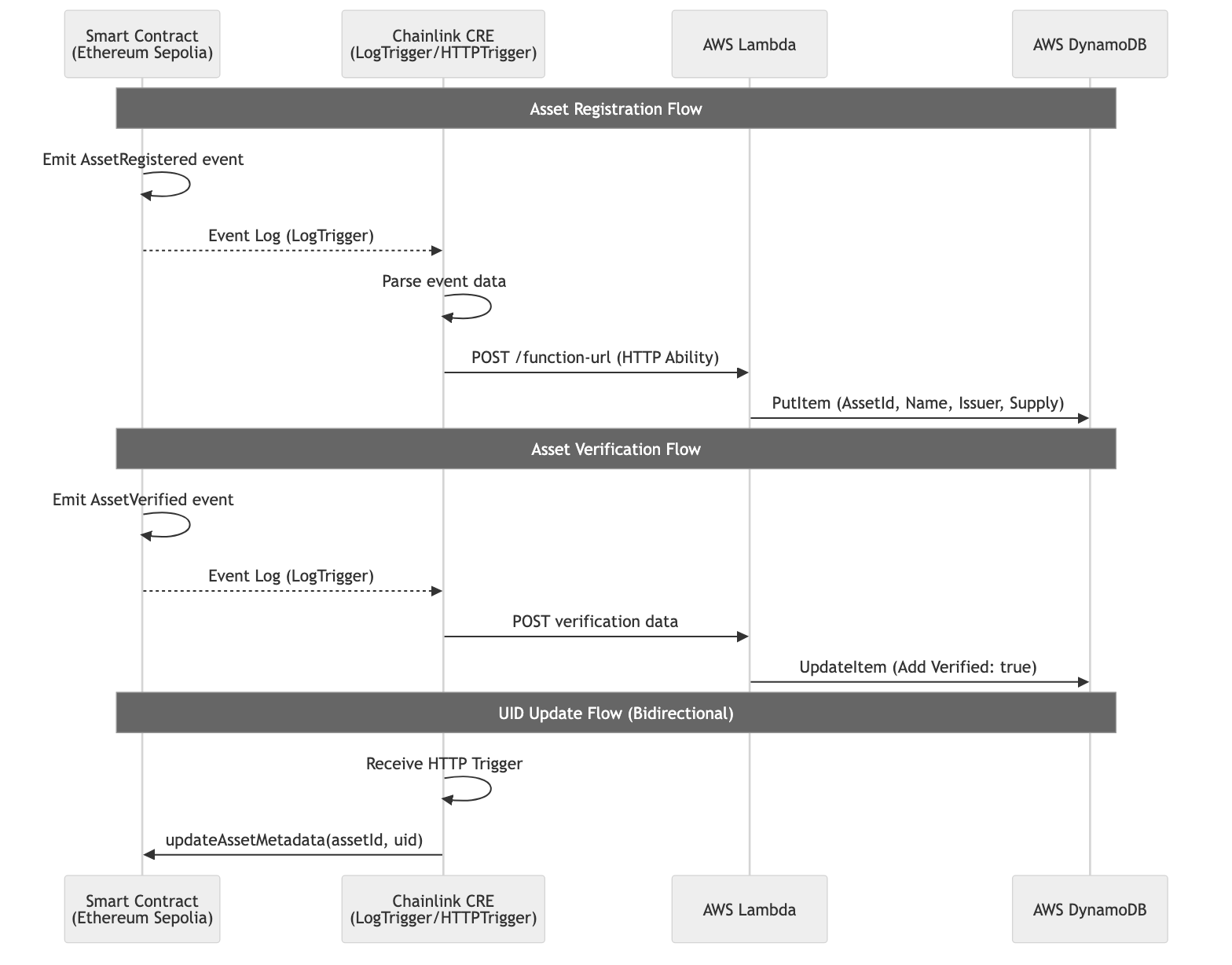
This project addresses these challenges by employing Chainlink CRE to bridge on-chain events with off-chain storage and retrieval:
- LogTrigger captures events emitted by the tokenization platform contract.
- Extracted event data is parsed, normalized, and encapsulated into a structured HTTP payload.
- The HTTP Ability dispatches this payload as a RESTful API request to an AWS Lambda function.
- The Lambda function persists the processed data into an AWS DynamoDB NoSQL database.
This architecture decouples on-chain immutability from off-chain accessibility, providing stakeholders with near-real-time visibility into asset lifecycles without compromising blockchain integrity.
Flow Diagram
Prerequisites
Before proceeding, ensure the following are set up:
Tools:
Blockchain:
- Ethereum Sepolia testnet access (e.g., via Alchemy or Infura RPC endpoint)
- Sepolia test tokens (ETH) for gas
AWS:
- AWS account (Free Tier eligible) with IAM roles for DynamoDB and Lambda
Getting Started
1 Clone and configure the project
git clone https://github.com/smartcontractkit/cre-templates.git
cd cre-templates/starter-templates/tokenized-asset-servicing/
You can update the Ethereum Sepolia RPC url with yours or use the default one in project.yaml:
local-simulation:
  rpcs:
    - chain-name: ethereum-testnet-sepolia
      url: <YOUR_RPC_URL>
2 Deploy Smart Contracts
Change to the contracts directory and install dependencies:
npm install
Deploy the contract to Ethereum Sepolia testnet:
npx tsx ./1_deploy.ts
Then create the config file and update it with your deployed contract address:
cd ../asset-log-trigger-workflow
cp config.json.example config.json
Update assetAddress in config.json with your deployed contract address.
3 Set up AWS DynamoDB
- Go to the AWS Management Console
- Search for DynamoDB and create a table named
AssetStatewith partition key:AssetId(string) - Leave other settings as default
4 Set up AWS Lambda Function
- Search for Lambda in AWS dashboard
- Create a new function named
Asset-lambda-functionwith Node.js 22 runtime - Copy the Lambda function code from
lambda-function/index.mjsin the repository - Update the
yourAwsRegionandTABLE_NAMEvariables - Deploy the function
- Under Configuration → Function URL, create a URL with "NONE" auth type
- Add the function URL to
asset-log-trigger-workflow/config.json - Grant the Lambda function
AmazonDynamoDBFullAccesspermission via IAM
5 Install workflow dependencies
cd asset-log-trigger-workflow
bun install
Create a .env file from the example:
cd ..
cp .env.example .env
Add your private key (without the 0x prefix) to the .env file.
Usage Examples
1 Register an Asset
From the contracts directory:
npx tsx ./2_registerNewAsset.ts
Then trigger CRE with the event log:
cd ../asset-log-trigger-workflow
cre workflow simulate asset-log-trigger-workflow --broadcast --target local-simulation
Select LogTrigger (option 1) and enter the transaction hash and event index (1 for AssetRegistered).
2 Verify an Asset
npx tsx ./3_verifyAsset.ts
Then trigger CRE with event index 0 for the AssetVerified event.
3 Update Asset UID via HTTP Trigger
cre workflow simulate asset-log-trigger-workflow --broadcast --target local-simulation
Select HttpTrigger (option 2) and enter a JSON payload:
{ "assetId": 1, "uid": "bca71bc9-d08e-48ef-8ad1-acefe95505a9" }
Verify the update:
npx tsx ./4_readUid.ts
4 Mint Tokens
npx tsx ./5_mint.ts
Then trigger CRE with event index 1 for the TokensMinted event.
5 Redeem Tokens
npx tsx ./6_redeem.ts
Then trigger CRE with event index 1 for the TokensRedeemed event.
Troubleshooting
AWS Lambda Internal Server Error on Invocation:
Verify that the Lambda execution role has the necessary IAM permissions for DynamoDB operations (e.g., dynamodb:PutItem, dynamodb:UpdateItem). Check CloudWatch Logs for detailed error traces.
Chainlink CRE Fails to Detect Events: Transactions may emit multiple events in sequence; ensure the LogTrigger targets the correct event index. Use Etherscan to inspect raw logs and correlate with CRE configuration.
Solidity Compilation Errors: These often stem from version incompatibilities in OpenZeppelin contracts. Use OpenZeppelin v5.x for ERC-1155 implementations.
Security Considerations
- This is a demo project - Not production-ready
- Lambda function security - In production, use proper authentication for Function URLs
- IAM permissions - Follow least-privilege principles for production deployments
- Secrets hygiene – Keep real secrets out of version control; use secure secret managers for
.envvalues.