# CCIP Manual Execution
Source: https://docs.chain.link/ccip/concepts/manual-execution
Last Updated: 2025-07-21
> **NOTE: Prerequisites**
>
> Read the CCIP [Concepts](/ccip/concepts) and [Architecture](/ccip/concepts/architecture/overview) pages to understand
> all the concepts discussed on this page.
In general, messages are successfully delivered and processed via CCIP as described in the [Architecture](/ccip/concepts/architecture/overview) page. However, some exceptional conditions might require users to manually execute the transaction on the destination blockchain:
- The receiver contract on the destination blockchain reverted due to an unhandled exception such as a logical error.
- For token pools, if the combined execution of the required functions (`balanceOf` checks and `releaseOrMint`) exceeds the default gas limit of **90,000 gas** on the destination blockchain, CCIP execution will fail. Read the Token pools [common requirements](/ccip/concepts/cross-chain-token/evm/token-pools#common-requirements) to learn more.
- The receiver contract on the destination blockchain reverted due to the gas limit being insufficient to execute the triggered function (Note: The gas limit value is set in the [extraArgs](/ccip/api-reference/evm/v1.6.1/client#genericextraargsv2) param of the message).
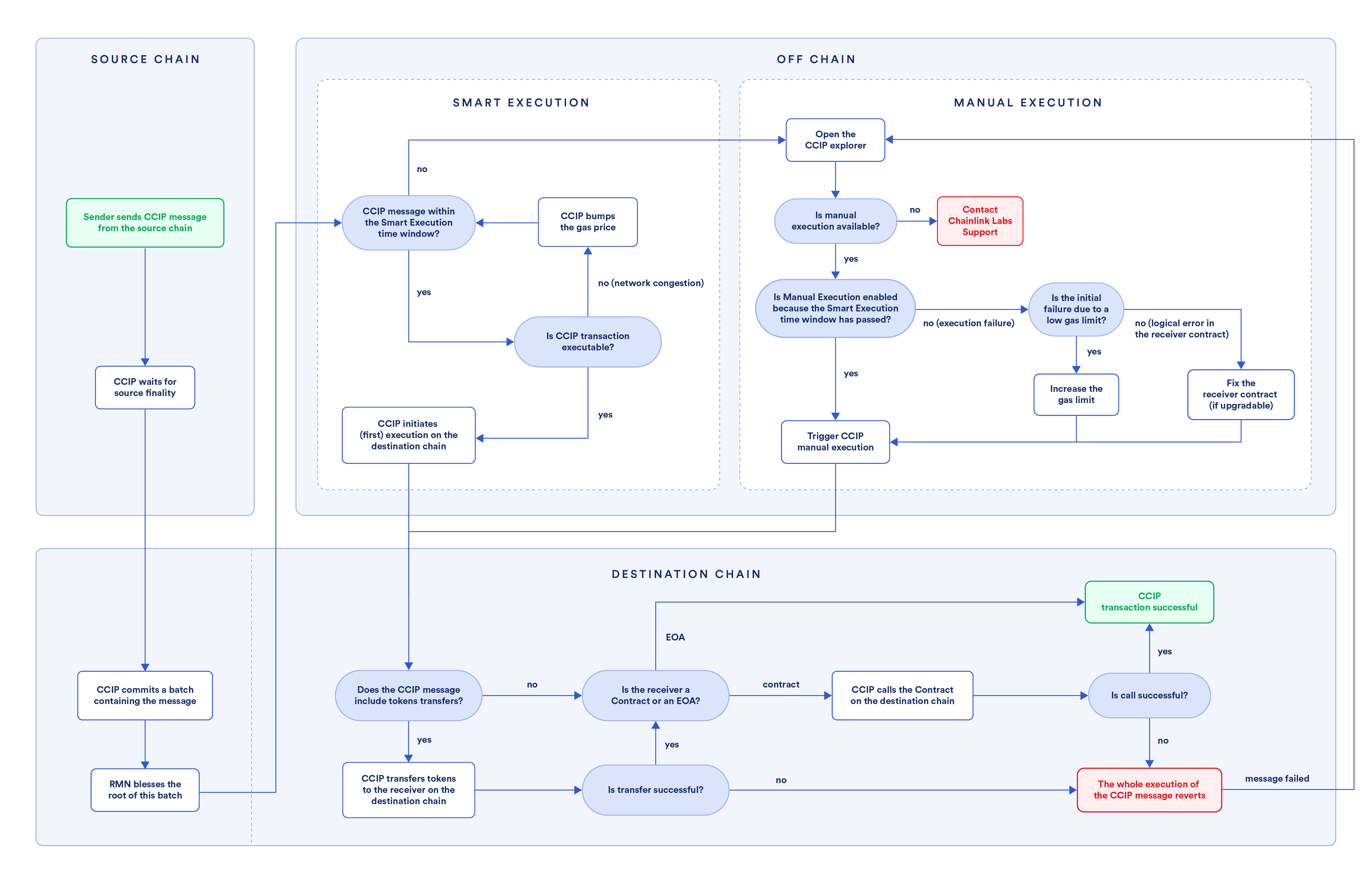
The flowchart below displays the process of a cross-chain transaction, detailing the steps involved in the manual execution:
## CCIP execution
1. A sender contract or EOA initiates a CCIP message on the source blockchain.
2. [CCIP Committing DON](/ccip/concepts/architecture/offchain/overview#commit-ocr-process) awaits [finality](/ccip/concepts/architecture/key-concepts#blockchain-finality) on the source blockchain.
3. Post finality, the [CCIP Committing DON](/ccip/concepts/architecture/offchain/overview#commit-ocr-process) assembles a batch of eligible transactions, computes a Merkle root, and records it to the OffRamp contract on the destination blockchain.
4. After the committed Merkle root is blessed, the [CCIP Executing DON](/ccip/concepts/architecture/offchain/overview#executing-ocr-process) proceeds with the execution on the destination blockchain.
5. The execution on the destination blockchain works as follows:
1. If the message involves token transfers, the tokens are first transferred to the receiver. **Important:** If the combined execution of the required functions (`balanceOf` checks of the token contract and `releaseOrMint` of the token pool contract) exceeds the default gas limit of **90,000 gas** on the destination blockchain, CCIP execution will fail, and the transaction will become eligible for manual execution. It is highly recommended to design your token pools to stay within this gas limit to avoid execution failure. Read the Token Pools [common requirements](/ccip/concepts/cross-chain-token/evm/token-pools#common-requirements) to learn more.
- If the receiver is an EOA, then this transaction is considered complete with no further processing.
- If the receiver is a smart contract, the [ccipReceive](/ccip/api-reference/evm/v1.6.1/ccip-receiver#ccipreceive) function is invoked after the token transfer. The ccipReceive function processes the CCIP message and any user-specified logic in the receiver contract. The execution of the CCIP message is atomic (all or none). If the ccipReceive function successfully executes, then all aspects of the transaction are complete, and there is no revert. If, however, there is an issue in the receiver execution due to insufficient gas limit or unhandled exceptions, the attempted token transfer will also revert. The transaction then becomes eligible for manual execution.
2. If the message does not involve token transfers, only arbitrary messaging, and the receiver execution fails due to gas limits or unhandled exceptions, the transaction becomes eligible for manual execution.
## Manual execution
As described above, a CCIP message becomes eligible for manual execution for various reasons. Manual execution means that a user has to manually trigger the execution of the destination transaction after the issue that caused manual execution has been resolved.
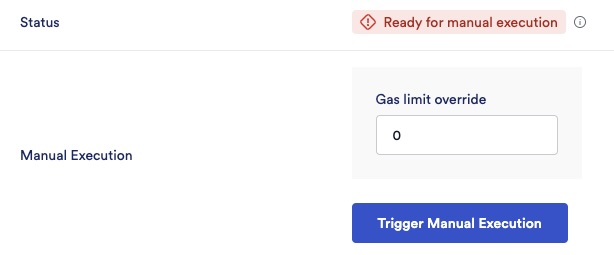
When a CCIP message is eligible for manual execution, the [CCIP explorer](https://ccip.chain.link/) shows the following information:
- *Ready for manual execution* status
- The possibility to override the gas limit and a *Trigger Manual Execution* button
Depending on the situation, you can take one of the following steps:
- Insufficient gas limit: The executor can connect their wallet, override the gas limit parameter, increase the gas limit for this particular execution, and trigger a manual execution. If this new gas limit override is sufficient, the transaction will go through successfully. **Note:** This gas limit override applies only to this manually executed transaction.
- Unhandled exception (logical error) in the receiver contract: If the receiver contract is [upgradeable](https://blog.chain.link/upgradable-smart-contracts/), developers must correct the logic, re-deploy the logic contract, and then manually execute the same transaction. If the receiver contract is not upgradeable, developers must deploy a new receiver contract, and then users can send a new CCIP message. Non-upgradable contracts will not benefit from manual execution. **Note:** Always make sure to test your smart contracts thoroughly. As a best practice, implement fallback mechanisms in the CCIP receiver contracts to manage unhandled exceptions gracefully. Read the [Defensive example](/ccip/tutorials/evm/programmable-token-transfers-defensive) to learn more.
When manual execution is initiated, a Merkle proof is generated for the message to be executed. During execution, the CCIP explorer submits the Merkle proof and the new gas limit (if the initial failure was due to a low gas limit). This Merkle proof is verified by the [OffRamp contract](/ccip/concepts/architecture/onchain/evm/components#offramp) against the Merkle root in the OffRamp contract. This mirrors the automated execution performed by the [CCIP Executing DON](/ccip/concepts/architecture/offchain/overview#executing-ocr-process), with the addition that the execution is resubmitted using the gas limit you provide.
## Frequently asked questions
1. **Can anyone execute a transaction on the CCIP explorer even if they are not the initiator of the transaction?**
Yes, any EOA can manually execute a CCIP message that is eligible for manual execution. However, the executing account must have sufficient native gas tokens (such as ETH on Ethereum or POL on Polygon) to cover the gas costs associated with the delivery of the CCIP message.
2. **If a user sends multiple messages and the first message isn't successfully delivered and goes into a *manual execution* mode, does that mean all subsequent messages from the user will also be stuck?**
It depends. If a message goes into manual execution mode due to receiver errors (unhandled exceptions or gas limit issues), subsequent messages don't get automatically blocked, unless they would encounter the same error. However, suppose a message goes into manual execution mode after the Smart Execution time window expires (currently 8 hours). In that case, subsequent messages must wait for the first message to be processed to maintain the default sequence.
3. **If the maximum gas limit is 3M (3,000,000) on mainnet, but it turns out that the destination blockchain requires more than that, will an override of > 3M still work?**
Yes, but only for this execution. This works because the gas limit for this execution instance isn't passing through the CCIP validation for the gas limit, for which the CCIP executing DON pays the gas. However, if you consistently need more than 3M for your use case, please reach out to us via this [contact form](https://chain.link/ccip-contact).
4. What should I do if my token pool's gas consumption exceeds the 90,000 gas limit on the destination blockchain?
If your token pool's combined execution—including the `balanceOf` function calls before and after minting/releasing, and the `releaseOrMint` function—consumes more than **90,000 gas** on the destination blockchain, CCIP execution will fail. It's highly recommended to optimize your token and token pool contracts to stay within this limit. However, if you cannot optimize further and consistently require more gas, please [contact](https://chain.link/ccip-contact?v=Tokens:%20Gas%20limit%20update) Chainlink Labs to request assistance.
1. **Will Chainlink Labs reimburse us for manual execution fees?**
Since most manual execution situations are due to insufficient gas limit or an unhandled exception in the receiver contract, Chainlink Labs does not reimburse these fees. If you are a dApp developer, please ensure you test thoroughly to avoid manual executions to the extent possible.
2. **Do I have to manually execute via the CCIP explorer? Are there any other ways to do this?**
The CCIP explorer provides the easiest way to execute manually. It handles all the complexity of submitting the Merkle proof needed for successful transaction execution.
3. **How do I know if my receiver error is due to a gas limit issue or an unhandled exception?**
If you see a *ReceiverError* with a revert reason as empty (0x), this is likely due to a gas limit issue. You can look at the transaction trace for the destination transaction on a tool such as [Tenderly](https://tenderly.co/), and you will likely see an *out of gas* reason mentioned in such cases. Determine the gas limit that would work for your transaction and manually override it. Read the [manual execution](/ccip/tutorials/evm/manual-execution) tutorial to analyze an example of an exception due to a low gas limit.
4. **How can I write contracts that avoid manual execution situations in the first place?**
- Test thoroughly to ensure logical conditions for all paths are gracefully handled in your receiver contract.
- Set a gas limit that works for complex execution paths, not just the simplest ones. Read the [best practices](/ccip/concepts/best-practices/evm#setting-gaslimit) for gas estimation.
- Refer to the [Defensive example](/ccip/tutorials/evm/programmable-token-transfers-defensive) tutorial for an example of how to design a programmable token transfer that handles errors gracefully.
5. **My transaction meets one of the conditions to trigger manual execution, but I do not see this option on the CCIP explorer. How am I supposed to execute this manually?**
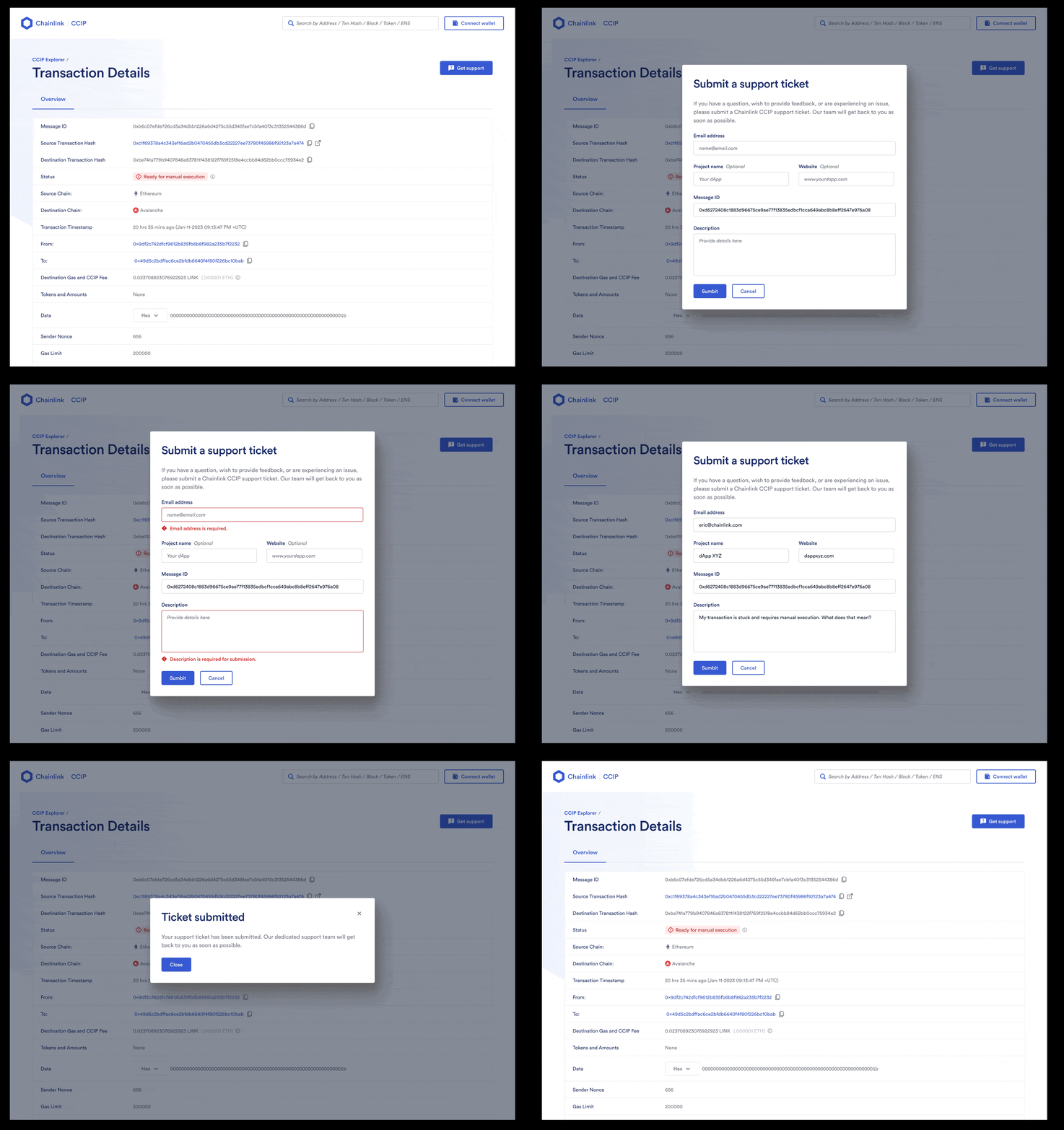
This should not happen, but in the unlikely scenario that it does, please submit a support ticket as shown below. Include the CCIP Message ID, your preferred contact details, and a detailed description of the issue you faced. This will help us assist you more effectively.